

1Weather Forecasts & Radar
OneLouder Apps
I usually judge a weather app twice: first when I am curious enough to explore it, and again after the novelty has gone. 1Weather Forecasts & Radar made a good first impression because it puts the information I check most often—current conditions, upcoming forecasts, radar, alerts, and widgets—within easy reach. After using it as a regular weather companion, I found that its lasting value depends less on dramatic features and more on whether its everyday view fits your routine.
Developed by OneLouder Apps, this free weather app is aimed at people who want more than a single temperature reading. It is available for Everyone, supports devices running Android 7.0 or later, and includes optional in-app purchases ranging from $0.49 to $19.99 per item. Its current version is 11.8.3, so the experience is that of a mature product rather than a brand-new experiment.
That maturity is reflected in its reach: it has passed 100 million installs and holds a 4.3 average from around 1.1 million ratings. Those figures do not automatically make it the right choice, but they do explain why the app feels established. I would recommend trying it if you want a weather tool that can serve both quick glances and more deliberate checks before travel or outdoor plans.
Related News

How Google Gemini Transforms Your Workday

Microsoft Authenticator: Your Essential Security Ally
Stay Ahead of the Storm with Weather & Radar's Real-Time Tracking
What makes the first week appealing
During the first few days, the main attraction is how quickly I can move from a broad overview to a useful detail. I can check the present conditions, look ahead at the forecast, open radar when rain is approaching, and pay attention to severe-weather notifications without treating each task as a separate app routine.
That combination matters in ordinary situations. Imagine leaving for work on a morning when the sky looks harmless but rain is expected later. A quick look at the forecast helps me decide whether to carry a coat, while radar gives a more immediate sense of whether precipitation is moving toward my area. Later, an alert can become more important than the forecast itself if conditions change quickly.
Related News

Instagram Is No Longer a Photo App. It Is an Attention Engine

Microsoft Teams Mobile: When Collaboration Becomes Navigation

How the NFL App Adapts to Android and iOS Updates

Temu: Elevate Your Shopping Experience to Billionaire Status

Why Traffic Rider Works Best as a Precision Reflex Game

How Google’s Find Hub Transforms Everyday Searches
The app is also easy to understand for someone who does not want to study meteorology. The visual presentation makes the important information recognizable at a glance, while the deeper screens are there when I want more context. I like that balance because a weather app becomes irritating when every check feels like research.
The home-screen widgets are especially useful during the first week because they change the way I interact with the app. Instead of opening it every time, I can see a compact update while checking other information on my phone. That is a small convenience, but it is the kind that determines whether a weather app becomes part of a routine.
My practical setup advice is to begin with one primary location and place the widget where you naturally look in the morning. Adding too many locations immediately can make the experience feel busier than necessary. I would add a second location only if you regularly commute, travel, or monitor family members in another area.
Gallery
Radar is more useful when treated as a decision tool
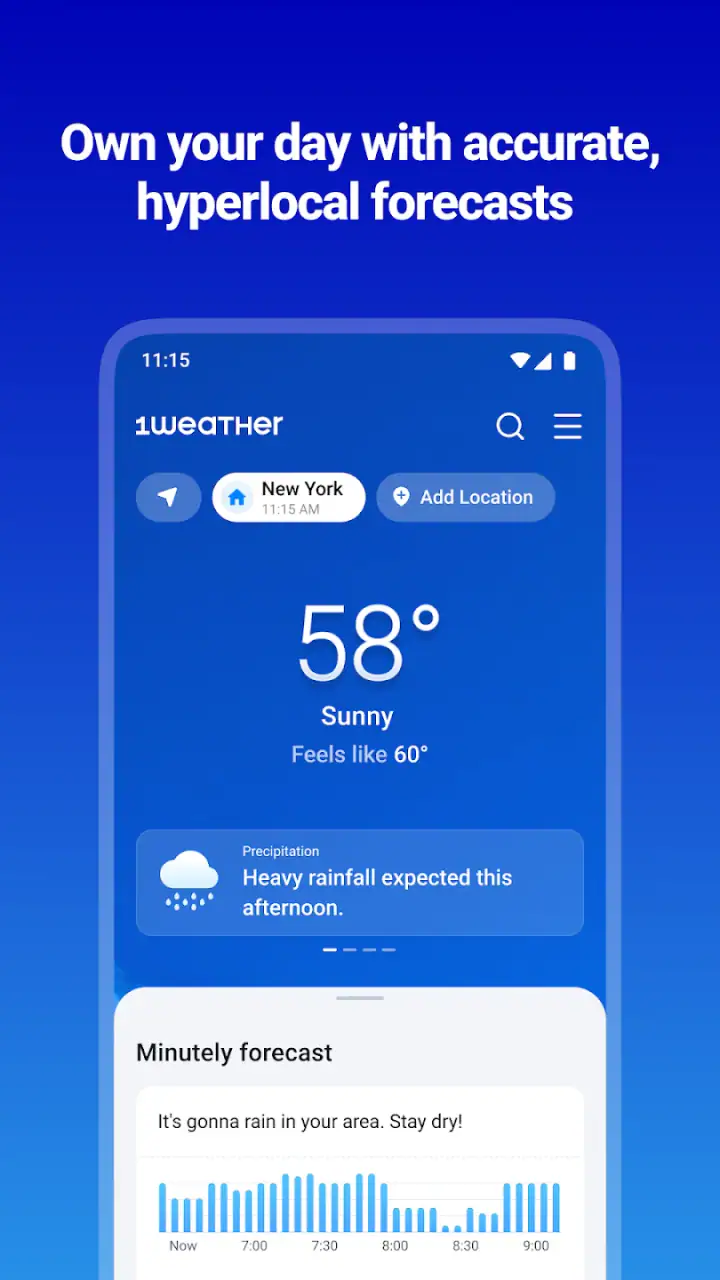
Many people open radar simply because it looks more advanced than a forecast icon. I found it more valuable when I used it to answer a specific question: should I leave now, wait a little, or change my plan? Looking at the movement of precipitation near the time I need to go is more practical than repeatedly refreshing the screen without a decision in mind.
Radar should not replace the broader forecast. It helps with near-term timing, while the forecast is better for planning later in the day or the next few days. Keeping those roles separate prevents one of the common mistakes with weather apps: assuming a radar view can tell you everything about conditions hours from now.
Alerts need thoughtful handling
Severe-weather alerts can be one of the strongest reasons to keep the app installed, particularly for people who live in places where conditions can change rapidly. They also require a little judgment. An alert is useful when it helps me act, but repeated or poorly timed notifications can make me stop paying attention.
I recommend treating alerts as a safety layer rather than the entire reason to use the app. Keep them meaningful, and use the regular forecast for everyday choices such as clothing, commuting, errands, and outdoor plans. If you are especially sensitive to notifications, spend time adjusting your phone’s notification behavior so the app supports your routine instead of interrupting it.
Why it can remain useful month after month
The strongest long-term argument for 1Weather is repetition. Weather is not a one-time problem, so a good app earns its place by making small daily decisions easier. The widget can handle the quick morning check, the forecast can support planning, radar can help with immediate timing, and alerts can matter when conditions become serious.
I also appreciate that the app can serve different levels of attention. On a busy morning, I may only look at the current temperature and the next part of the forecast. Before a weekend walk, I may inspect the outlook more carefully. When rain is already visible outside, radar becomes the more relevant screen. That flexibility gives the app a better chance of surviving beyond its first-week appeal.
For travel, I would use it as a planning aid rather than a guarantee. Checking the destination before leaving can help me prepare, but weather information changes, and local conditions can differ from what a broad forecast suggests. The sensible workflow is to check before departure, check again near the activity, and keep alerts enabled when severe conditions are a real concern.
People who work outdoors may find the app more valuable than someone who spends most of the day indoors. A landscaper, delivery worker, cyclist, or parent arranging outdoor activities benefits from having several views of the same situation. Someone who only wants to know whether it is hot or cold may find the extra radar and alert options unnecessary.
Its large user base also suggests that the basic experience has broad appeal, but I would not confuse popularity with precision for every location. Weather apps can differ because forecasts and observations are interpreted through regional systems, update timing, and local conditions. If weather accuracy is critical to your work or safety, I would compare this app with an official local weather service rather than relying on one source alone.
A useful routine for recurring value
My preferred routine is simple. I glance at the widget in the morning, open the full forecast only when I am making a decision, and use radar shortly before leaving if rain is likely. I reserve severe-weather notifications for situations where I genuinely need an interruption. This keeps the app useful without turning it into something I constantly monitor.
There is also a less obvious benefit to this approach: it reduces false confidence. A single icon can make the day look settled, while a quick radar check may reveal that the next hour is different from the rest of the forecast. Combining the views gives me a more realistic picture without requiring a long session.
The maintenance burden is fairly low, but not invisible
A weather app should be close to effortless after setup, and this one mostly meets that expectation. Once locations, widgets, and notifications are arranged, the daily interaction is quick. That is important because maintenance is where many apps lose their place on my phone. If I have to constantly reorganize screens or dig through menus, I stop using them.
The main ongoing task is keeping the display relevant. A widget that shows a location I no longer visit becomes visual clutter, and alerts that no longer match my needs become background noise. I would review the setup after a move, a change in work schedule, or a long trip rather than leaving every old location active indefinitely.
Storage and battery considerations are also part of the practical decision, even when they are not the first things people think about. A widget and notifications are convenient because they keep information visible, but every always-available feature should earn its place. If you are trying to simplify your phone, start with the basic widget and only retain radar or alert behavior that you actually use.
The free price makes experimentation easy, while the optional purchases mean some users may encounter paid extras during their time with the app. I see that as a reasonable trade-off for someone who wants to begin without paying, but it is worth deciding early whether the free experience already covers your needs. If it does, there is no reason to treat optional additions as essential.
The minimum Android requirement of 7.0 is helpful for people using older devices, although compatibility is still something I would check before committing to a particular phone. On a supported device, the more important question is not whether it can display weather information, but whether its widgets and notification habits fit the way you use your phone.
Where the routine can become tiring
The biggest source of fatigue is not the amount of information; it is the possibility of receiving too much of it. Forecasts, radar, widgets, and alerts can each be useful, but together they can make the phone feel overly focused on weather. I prefer a restrained setup because I want the app to answer questions when I have them, not create a reason to check constantly.
Another possible frustration is that weather information can appear more precise than real life feels. A forecast may show a clean sequence of conditions, while a short walk reveals wind, shade, local rain, or changing temperatures that are not obvious from the overview. I use the app to prepare, not to expect perfect certainty.
The visual emphasis on radar may also be wasted on users who never need short-term precipitation tracking. If you only want a minimal temperature display, a simpler built-in weather tool may be less distracting. Likewise, people who already depend on a trusted local weather authority may not gain enough from adding another general-purpose app.
There is a trade-off between convenience and attention. The more the app is placed on the home screen and allowed to notify you, the more useful it can be at the right moment. But the same visibility can become annoying when your days are predictable or when you are not making weather-sensitive decisions. I would rather configure it lightly and expand its role only when a real need appears.
Who should install it, and who should choose something else
I think 1Weather is a good fit for someone who wants one established Android weather app covering everyday forecasts, radar, severe-weather alerts, and home-screen access. It is particularly suitable for households with changing schedules, commuters who need to judge rain timing, and anyone who spends enough time outdoors to benefit from more than a current temperature.
It is also a sensible option for people who want to start free and decide later whether optional purchases are worthwhile. The app does not force a complicated commitment at the beginning, and the basic habit can remain simple if you avoid enabling every available surface at once.
I would skip it if your priority is absolute minimalism. A basic weather widget may be better for a person who checks conditions only occasionally and does not care about radar. I would also look elsewhere if your work depends on highly specialized forecasting, official local warnings, or professional weather analysis. In those cases, a dedicated regional or industry-focused source may deserve priority, with this app used only as a convenient secondary view.
iPhone users should also be aware that this particular version information and minimum operating-system detail describe the Android experience. The broader question remains the same on any platform: does the app’s mix of glanceable information, mapping, alerts, and widgets offer more value than the weather tools already built into your device?
My long-term verdict
After the initial exploration, the app’s lasting value comes from habit rather than spectacle. I do not keep it installed because radar is visually interesting or because a weather screen gives me something new to explore every day. I keep it useful by assigning each part a job: the widget for speed, the forecast for planning, radar for near-term timing, and alerts for serious changes.
That division makes the experience feel practical. It also exposes the app’s main limitation: it can become more involved than necessary if you allow every feature to demand attention. The best results come from a deliberate setup, not from turning on everything and hoping the app will organize your day for you.
For a free weather app from OneLouder Apps, the overall package is convincing. The 4.3 average and broad adoption fit my impression of a dependable, mature tool, though neither popularity nor a rating can replace checking whether the forecasts work well for your location and routine. I would give it a fair trial with one location, one widget, and carefully chosen notifications.
My recommendation is straightforward: install it if you want a weather companion that can grow from a quick glance into a more useful planning tool. Give it a smaller role if you prefer a clean phone or already trust a specialized local source. The app earns lasting space when it quietly improves decisions you make every day, not when it becomes another screen you feel obliged to monitor.
FAQs for 1Weather Forecasts & Radar
What features does 1Weather Forecasts & Radar offer?
1Weather provides a comprehensive suite of weather-related features. Users can access real-time weather updates, detailed forecasts for up to 12 weeks, radar maps, and severe weather alerts. The app also includes interactive graphs for temperature and precipitation, ensuring you are well-prepared for changing weather conditions.
Is 1Weather Forecasts & Radar free to use?
Yes, 1Weather is free to download and use. However, it offers in-app purchases for users who want to upgrade to an ad-free experience. The premium version also includes additional features such as more detailed weather maps and an extended forecast range.
How accurate are the weather forecasts provided by 1Weather?
1Weather is known for its accuracy, as it sources data from trusted meteorological institutions. It uses advanced algorithms and multiple data points to provide precise forecasts. Nevertheless, users should note that no weather app can guarantee 100% accuracy, especially with long-term predictions.
Can I customize notifications in 1Weather?
Yes, 1Weather allows users to customize notifications according to their preferences. You can set alerts for severe weather conditions, daily forecasts, and temperature changes. This feature ensures that you receive timely updates tailored to your needs, helping you stay informed about local weather conditions.
Does 1Weather support multiple locations?
1Weather supports tracking weather for multiple locations. This is particularly useful for frequent travelers or those who want to monitor weather conditions in different areas. You can easily add and switch between locations, ensuring you have up-to-date weather information wherever you are.
Pros
- Accurate weather predictions.
- Clean and intuitive interface.
- Customizable notifications.
- Global weather coverage.
- Detailed radar maps.
Cons
- Ads can be intrusive.
- Some features require payment.
- Occasional app crashes.
- Limited widget customization.
- Battery usage can be high.


